

[ ENTERING_THE_COPY_DESK ]
BVT INSTALLER Copies · Workspace · Phone control One program. Up to ten copies.
- 10 $COPIES_PER_PROGRAM
- 1 $FOLDER_PER_COPY
- 3 $PLATFORMS
- 3 $FREE_COPIES
"Every copy in its own room"
BVT INSTALLER starts the same Windows program again and again, and gives every copy its own folder, so each one keeps its own sign-in, settings and history. Add a program you already have, any .exe or a setup file, choose how many copies you want, and watch them all in one Workspace. From your phone or any browser, signed in to your BitVault account, you can see your PCs and start, stop or restart their copies.
Free for 3 copies of each program · No card · Windows 10 and 11 · Built by BitVault
SCROLL_TO_ENTER[ /LIVE_COPIES ]
The copy board
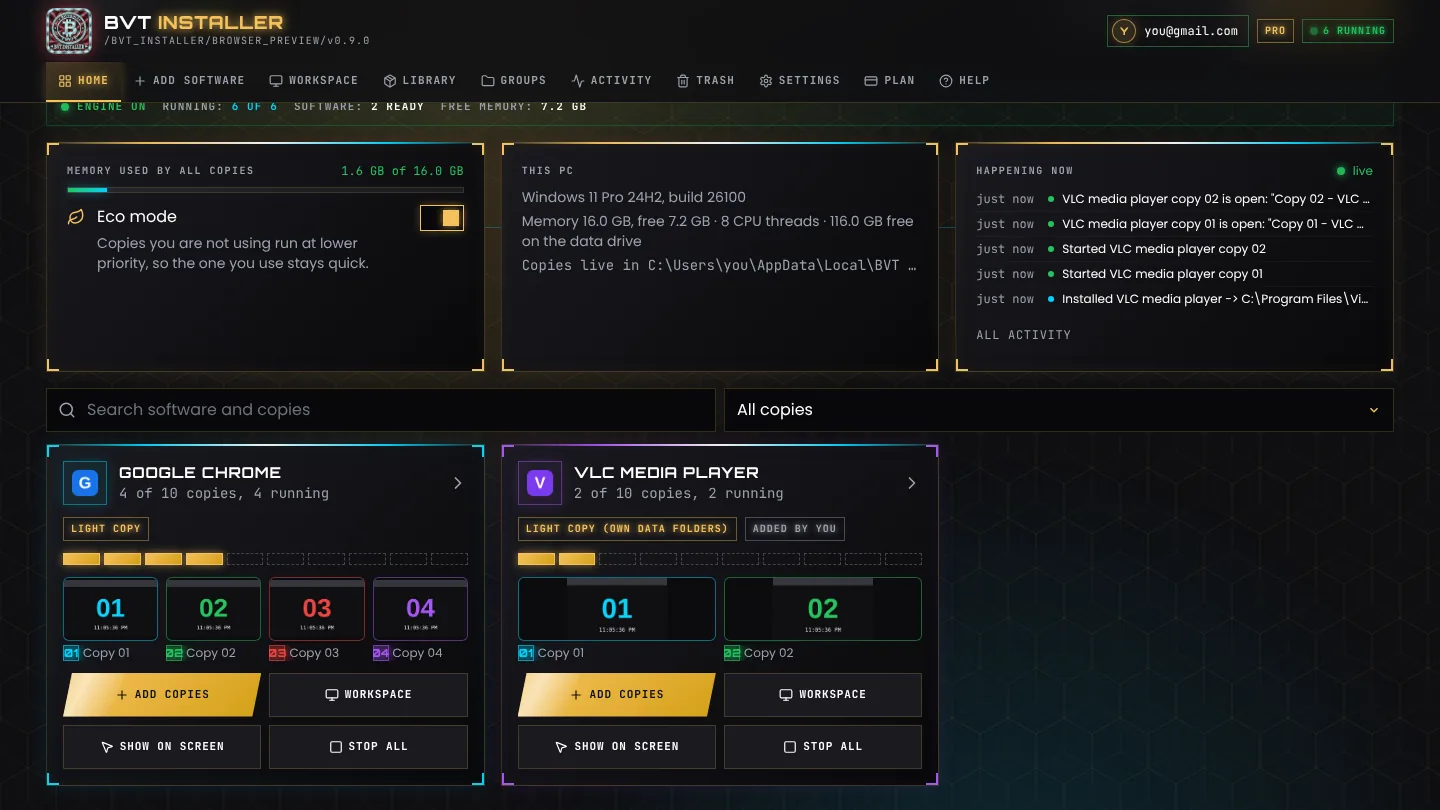
Every copy, its own folder and what it is doing right now. Start one more and it lines up below the others, with its number on its window and in the taskbar.
Example copies. Each folder sits inside BVT's data folder on your PC. A program that allows only one copy on the whole PC closes its extra copies by itself; BVT tells you so in plain words and never tries to break that lock.
[ /HOW_IT_WORKS ]
Five steps
Add a program once. After that, a new copy is one button, and every copy keeps its own sign-in and settings for next time.
- ◆ Step 1
/ADD_SOFTWARE/
Add a program
Pick a program on this PC, any .exe file, a setup file that BVT installs for you with live steps, or a name that Windows' winget installs.
⚡ 4 ways✓ No admin - ◆ Step 2
/CHOOSE_COPIES/
Choose how many
From 1 to 10 copies of each program. Free runs 3 copies of each program, Pro runs 10. Give copies names and put them in groups.
⚡ Up to 10Groups - ◆ Step 3
/OWN_FOLDER/
Every copy, its own folder
Browsers and apps built like them get their own profile. Other programs get a deep copy: their home, app data and temp folders all move inside the copy's folder.
⚡ Deep copy✓ Nothing mixes - ◆ Step 4
/WORKSPACE/
Watch them together
Dock every copy inside one Workspace window, switch with the number keys, see them all in a grid, mute one or pop it out.
⚡ Focus + gridKeys 1-9, 0 - ◆ Step 5
/PHONE_AND_WEB/
Control from anywhere
Sign in to your BitVault account and turn on phone and web control. Your PCs and their copies show up here, in the browser and in the Android app.
⚡ Start · stop✓ Your account only
STARTEDTelegram Desktop #02
own folder …\telegram\02 · deep copy · ready in 4 sMUTEDGoogle Chrome #02
only this copy is quiet · the others still play soundNOTESignal #02 closed itself
Signal allows one copy on the whole PC · BVT does not break that lockPICKED UP4 copies were still running
BVT was closed, the copies stayed open · they are back on the board[ /WORKSPACE ]
All copies in one window
The Workspace docks every running copy inside BVT. Focus mode shows one big copy with the others in a rail; Grid mode shows them all at once as live tiles.
- Switch with the number keys 1 to 9 and 0, or with the arrow keys. G shows the grid, F goes full screen.
- Mute one copy with M: its sound stops, the other copies keep playing. Sounds that start later are muted too.
- Pop a copy out to its own window, and bring it back with one button.
- Every copy's window and taskbar button shows its number, so copy 03 never looks like copy 04.
- Close BVT and the copies can keep running. When BVT starts again it picks them up, or offers to close them.
[ /ANY_SOFTWARE ]
Built for real programs
Browsers, chat apps, work tools and launchers. BVT knows how the common ones keep their data and picks the right way to split it.
- Ready-made recipes for Chrome, Edge, Brave, Opera, Opera GX, Vivaldi, Chromium, Yandex, VS Code, Discord, Slack, Signal and Thunderbird.
- Any other program: pick its .exe. A setup file is installed for you in the background, with each step shown live and a Try again button.
- When Windows or an antivirus blocks a copy, BVT names the antivirus and the folders to add to its trust list. It never switches your antivirus off.
- Updates arrive by themselves and are checked against BitVault's signature before they install.
[ /PHONE_AND_WEB ]
Your copies, everywhere
Sign in on your PC with Google or email, and turn on phone and web control in Settings. Then open BVT INSTALLER in a browser or in the Android app with the same account: your PCs and their copies are there, live.
- 1 account
- Google or emailthe same BitVault account on your PC, your phone and the web
- 1 tap
- Start, stop, restartany copy on your PC, or Stop all, from wherever you are
- Pro follows you
- Your key is kept with your accountsign in on another PC and Pro comes with you
Phone and web control is off until you switch it on in BVT's Settings on that PC. Only copies you already set up in BVT can be started; nothing new is installed from the phone. Your PC sends the names of your programs and copies and whether they run, nothing else.
[ /SOFTWARE ]
The software itself
Real screens from the Windows app, shown with example data.
[ /FREE_AND_PRO ]
Free and Pro
Everything in BVT INSTALLER works on Free. Pro raises the limit from 3 to 10 copies of each program. Pro is a key you paste once; with a BitVault account it follows you to your other PCs.
Free
3
copies of each program
Every feature
Pro
10
copies of each program
Price at launch
Account
Free
Google or email, optional
Phone and web control
Updates
Free
signed, they install by themselves
The Pro price is announced at launch. There is no online payment yet: write to us and we send you a Pro key to paste on the Plan page. Pro keys are checked on your PC, with no internet needed.
The copies share your PC's processor, memory and internet. More copies do not make your PC faster or earn more where a service counts by device, and some services allow one account per person: follow their rules.
[ /PLATFORMS ]
Browser, Windows and Android
The copies themselves run on your Windows PC. The browser and the Android app show the same account: your PCs, their copies and your plan, with start and stop wherever you are.
/WINDOWS/
Windows app
Windows 10 and 11, 64-bit. A small setup file with no admin rights, or one portable file. It updates itself.
Download for Windows/BROWSER/
Any browser
iPhone, Mac or any computer. Sign in, see your PCs and their copies, and start or stop them.
▶ Run in the browser/ANDROID/
Android app
The same account full screen on your phone. Android asks once to allow installing from the browser.
Download for Android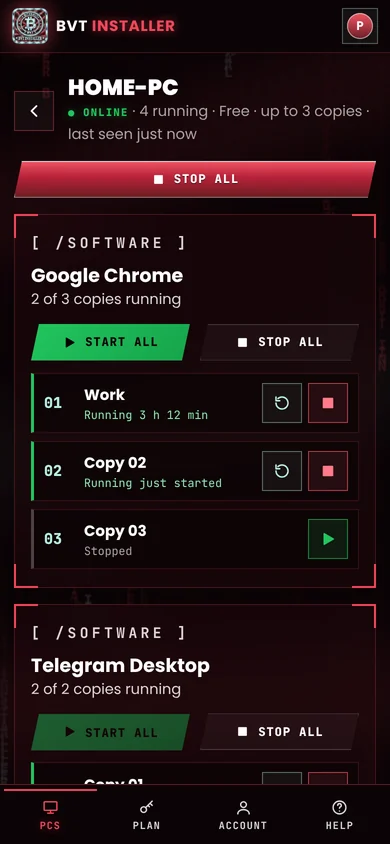
[ /FAQ ]
Questions
What does BVT INSTALLER do?
It runs one Windows program as several separate copies at the same time, up to 10. Each copy has its own folder, so each can be signed in to a different account and keep its own settings. You manage all of them from one place.
Does it work with every program?
It works with most programs. Programs that need administrator rights are not copied. A few programs allow only one copy on the whole PC and close any extra copy by themselves; BVT tells you when that happens and does not try to break the program's lock.
Can I run BVT INSTALLER on my phone or in a browser?
Yes, as a remote for your PCs. Windows programs can only run on Windows, so the copies run on your PC. The browser and the Android app sign in to the same BitVault account and show your PCs and their copies, with start, stop, restart and Stop all.
Why does Windows show a warning when I open it?
The files are not code-signed yet, so Windows SmartScreen may say "Windows protected your PC". Download only from this site and compare the SHA-256 fingerprint on the download page. Then choose More info and Run anyway. Signing is being set up.
Do I need an account?
No. The account is optional. Without it, BVT works fully on your PC. With it, your Pro key is kept with your account and you can use phone and web control.
What does BVT send over the internet?
Without an account: only the update check. With an account: your email, your name, your Pro key and the app version. With phone and web control on: also your PC's name and the names, numbers and status of your copies. Your copies' own data, passwords and files never leave your PC.
Will more copies slow my PC down?
Each copy uses memory and processor like the program itself. Start as many as your PC handles well; the Workspace shows pictures instead of live views unless you switch live view on, which saves power.
Does it change my antivirus?
No. If Windows or your antivirus refuses to start a copy, BVT names the antivirus and lists the folders you can add to its trust list yourself. It never switches it off or goes around it.
How do I remove it?
If you used the setup file, remove BVT INSTALLER in Windows Settings › Apps. The portable file you simply delete. Your copies' folders stay in %LOCALAPPDATA%\BVT Installer until you delete that folder too.
[ /CONTACT ]
Talk to us
A question, a program that will not copy, an idea or a Pro key for your team: write to us. We reply by email.